About / Setup
The desk, in full
Everything on and around the desk I work from, why it is there, and the role that they play.
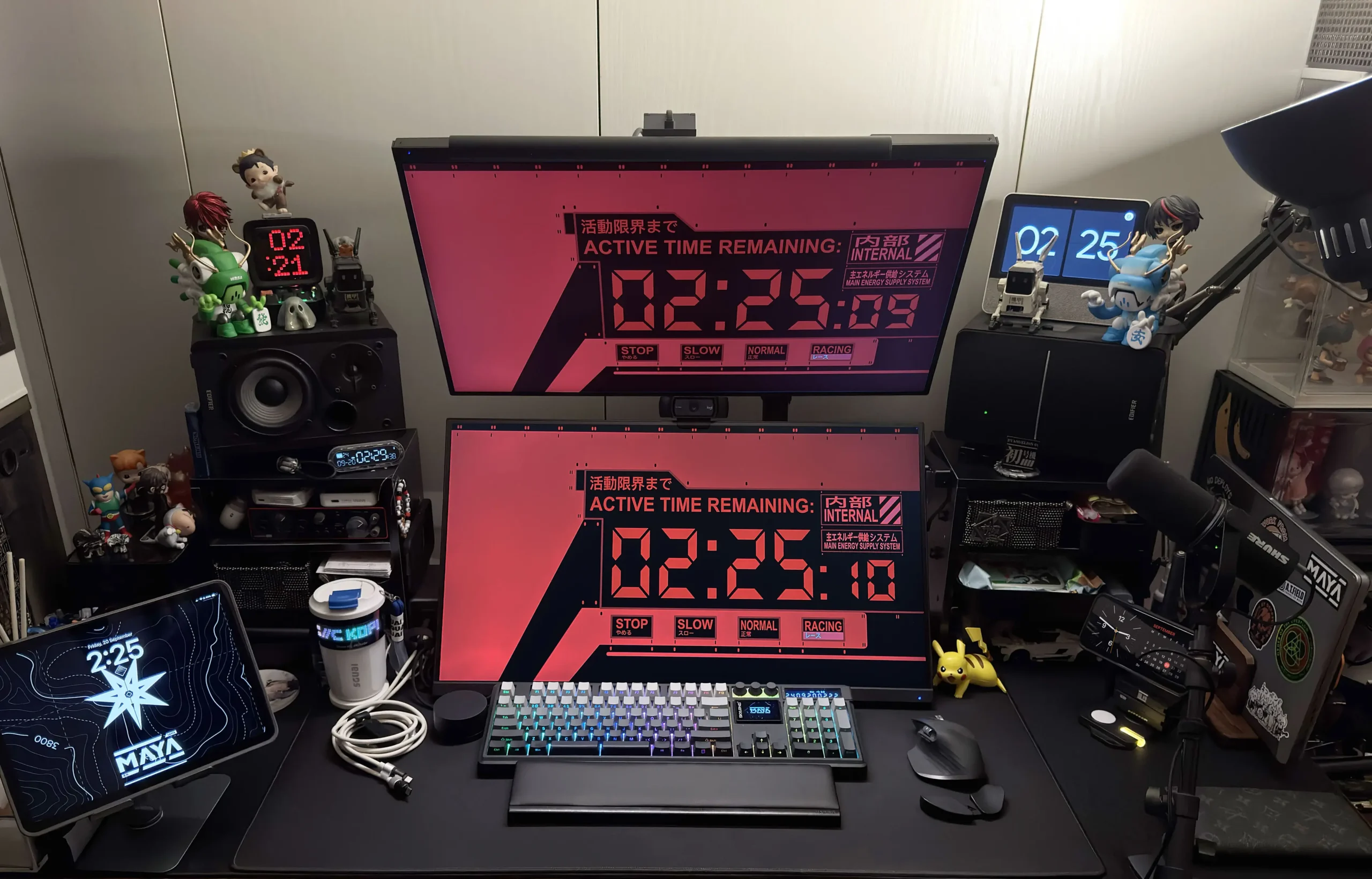
Display & Compute
The 2021 M1 Max Macbook Pro is my daily driver for the past 3 years. I got it on launch as my old laptop screen was cracked. Luckily, I only had to endure the cracked screen for just 1 month prior to the release of this model.
I spec’d mine to ensure I can use this laptop for years to come. Can’t live without this now.
I upgraded to the W280 Max from a single W270 Pro to cater for 4K content and productivity.
It’s not really suitable for gaming considering it’s capped at 60 FPS. The W280 Max has also since been discontinued and succeeded by the W280 Ultra.
I’ve been hunting for a TB3 and above dock to turn my setup into a one-cable connection for a long while and finally found the ORICO TB3 Dock to be within a decent budget.
My monitors are connected via the DP and USB-C port from this dock, the rest of the USB peripherals are daisy-chained via a USB 2 hub to one of the USB 2 ports to reduce cables from the dock. The dock is hidden from view behind the bottom monitor.
A novelty toy I got as a gift, I quickly find the Divoom Ditoo Plus in a very welcoming spot right in the middle of my set up. I do not recommend using it as a bluetooth speaker due to the sound quality but I chuckle every time my neighbour(s) accidentally connect to it and it starts playing some weird music.
A Christmas gift given by my company. The Lenovo Smart Display 7 is the main hub of my home automation and occasionally tells me about the weather when I ask.
Mobile, Tablets & EDCs
Got the iPad Air 5 as an anniversary gift from work.
Paired with the Logitech Combo Touch case, Pebble Mouse 2, I’m able to do development work and enjoy entertainment even when travelling. When I’m home, I place it on the Hagibis Rotating Tablet Stand for easy view and access.
I’ve been looking to get a newer iPad for note-writing to fully transition over to digital notes.
I’ve been using it with GoodNotes 6 for a few months now and have thoroughly enjoyed the experience.
I acquired the Apple Watch Series 9 this year to help with sleep tracking and notification management. The Apple Pay feature is also something I’ve wanted to make use of for quite awhile.
Storage & Disks
As a designer and developer, storage is always a problem, especially when you take into account PSDs, RAW video files as well as data dumps. I purchased the Orico 5-Bay HDD Dock to help with the ease of adding & swapping different disks.
The dock also comes in clutch for when I need to set up new disks and has the function to clone disks too.
The Western Digital Elements 6TB is placed behind the monitor out of view as a dedicated Time Machine backup of my Macbook Pro.
This allows me peace of mind when working with my Mac, without fear of accidentally deleting any critical files.
I tend to have huge files to share around, especially for client works, be it video, music or full backup of websites. The Sharge Disk allows me to bring along a light and high-capacity drive for that purpose.
Since it only takes 2230 NVMe drives, I installed the Crucial P310 2230 2TB.
Audio
Considering my Macbook Pro is docked in clamshell mode and all monitor speakers are crap out of the box, I needed a good speaker solution. At first I was using a sound bar, but very soon found the sound to be very flat.
The Edifier R1280DBs is one of the best speaker for their price point. You can easily find a new pair for below SGD$150.
The de-facto home studio interface for many years, it’s no question why the Scarlett 2i2 has a spot on my desk for the past 2 years.
It supports 2 universal inputs for a guitars and microphones which is perfect for a home studio.
One of the best microphones you can get for video conferences and podcasting in 2023 without having to purchase a bunch of other peripherals.
The Shure MV7 is the little brother of the SM7B. It can plug directly to your computer via USB and does not require an additional CloudLifter to remotely sound good, unlike it’s elder brother.
The MV7 microphone is mounted on the Samson MBA18, a desk clamp-styled extendable 18-inch Microphone Boom Arm.
Allowing me to shift it away when not in use to save precious desk space.
Charging & Cables
The Sharge Elevator is a 5200mAh MagSafe power bank. I bought it together with the Sharge Internet Host Key as a collectible.
The Sharge IceMag, another MagSafe power bank with a 10,000mAh capacity. I received this as a review unit and it replaced the original IceMag 1 that I bought as it's battery bloated after 2 years of use.
The Sharge Capsule Gravity was too cute to pass, I added all 3 colorways along with the Flow since it is also on 67% discount and kept one permanently on my speaker shelf.
It features a built-in Pomodoro alarm that you can activate by flipping it horizontally. I use it frequently to focus on tasks.
I bought a pair of the Gravaster Alpha65 Charger on impulse as the Crystal Blue colorway is limited to only 2,000 worldwide. I kept the limited edition one BNIB and bought another Dawn White to pair with the Charcoal Gray. I bought these purely for aesthetics.
To date, I have only used them once. I consider them just as a couple of decorative expensive desk toys.
Featuring 4 USB-C ports and a USB-A port, the UGreen Nexode 300W GaN Charger is hidden beside the shelving unit on the left of the monitor. It is capable of max output of 140W per USB-C port, up to 300W total output. I use it mainly to charge my iPad, and any other accessories I need to fast charge. The USB-A port is also useful for some peripherals that can only be charged via USB-A to USB-C cables.
I got the Aulumu M01 Wireless Charging Station to streamline my charging. It’s able to charge my phone, earbuds and watch all at once.
Ever since upgrading to iOS 17, the standby mode has been too aesthetic for me to ignore. I love how the notifications pop up and grab my attention while I’m working too.
It is also able to fold together into a flat pad too.
I have since gotten a second one so both my iPhones hae a magnetic home.
The Sharge Phantom cables are one of the best cables I’ve used. I like the texture and feel of it, and the logo that lights up is subtle and aesthetic. I keep a couple of them in my power bank pouch as well as a few of them lying around the house for whenever I need them.
I have them all in white, and that it can support 240W, and can pretty much future-proof my charging needs. I have two of them permanently on my table.
Input Devices
Saw Hipyo recommend this keyboard on his TikTok. Immediately bought it to replace my old Keychron K3 v2.
The Skyloong GK 104 Pro features two LCD panel and 3 knobs. Those who know me well enough knows I cannot resist the knobs.
The larger LCD panel is also able to display the GIF of your choice. The smaller LCD can turn into a quick calculator with a switch on the side.
The Hagibis Wrist Rest replaced my old HyperX wrist rest as I loved how I could store smaller items inside for quick access.
It currently holds some thumb drives, the remote for my speakers, a pen, some USB-C to USB-A adapters, a microSD to C adapter, as well as a SIM ejector tool.
I frequently work into the dead of the night and the virtually silent clicks, the horizontal scrollbar, and the hotkeys, the productivity-focused Logitech MX Master 4 is the obvious choice here.
Coupled with the DeltaHub Carpio 2.0, neither my hands nor my fingers has complained about the long hours I spend on my desk.
Since the MacBook Pro is in clamshell mode on the desk, I bought the Logitech C920 HD Pro after using my spare iPhone 11 Pro as a webcam.
The webcam sits comfortably, mounted on the SmallRig Encore DT-30 Desk Mount with Holding Arm behind the monitor so I don’t have to keep adjusting it as I take the laptop out for travel.
The Tecware Haste Cordura 900 Mouse Mat rests right on top of a custom-printed desk mat that covers the entirety of my desk to cover up the old stains and heat damage my antique wooden desk accumulated over the years.
Considering I tend to snack and eat at my desk when I work from home, the Tecware Haste has been a godsend as the Cordura material allows me to just simply wipe it down and it doesn’t stain even if crumbs or soup drips on it.
Lighting
Being a fan of industrial design and aesthetics. The IKEA Tertial Work Lamp is an obvious choice when it comes to deciding on a desk lamp.
I fitted it with a Tapo Multi-Color Smart Lightbulb, which I control via Google Home.
I’m someone who loves to work in the dark (well, with SOME light). The Mi Computer Monitor Light Bar is pretty much what is preventing me from ruining my eyes.
It illuminates my desk, ensuring I can see what’s on my desk no matter the time of day. I keep it on the warm light setting for a softer ambiance with the controller knob within arms reach.
Accessories
Received the SGUAI Smart Coffee Cup from One2World as a gift. I’ve been using it as a coffee cup whenever I need caffeine.
It’s more of a gimmick than anything useful, although it can keep my drink warm for an average of 3-4 hours, it’s not any better than any other coffee cup.
The only interesting part is the LCD panel, which you can customize with text, pixel art or animation via Bluetooth using their companion app.
My go-to electric screwdriver set. I have it within arm’s reach beside my charging station. The Wowstick 1F+ also comes with an elegant stand. There’s also a small light that illuminates the screw when you turn it on.
It also comes with a magnetic pad to make sure you don’t lose the screws when you unscrew them.
Added
The second 4K display was added.
Removed
A powered USB hub and two cables. The 90W single-cable path made all three redundant.